Untangling the 340B Split
Designing how one hospital order splits across purchasing channels, for a market where every hospital talks.
The short version
60 second read- The problem
- Hospitals buy through 340B, WAC and GPO channels, and one order has to be split across them. SureCost had no way to start that order.
- What I did
- Designed the whole workflow, from the requisition list to the worksheets under it, the file import and the error recovery for very large orders.
- How I tested it
- SureCost had no hospital customers yet, so I worked from analyst data and a market researcher’s findings, and tested a coded prototype with engineering.
- What happened
- It reached staging and was demoed to customers before I left in January 2026. It had not fully shipped.
About SureCost
SureCost is the leading purchasing platform for pharmacies. It was expanding into hospitals, which buy very differently. In hospital pharmacy, 340B is a federal drug discount program, and almost every acute care buyer lives inside it.
I was the only designer on this work. My job was the front door of the plan. A hospital starts an order in SureCost, the order is split across channels, and SureCost earns the rest of its purchasing from there.
My role
I was the sole designer on this initiative. The structure, the patterns, the names and the prototype were mine, built next to engineering.
End-to-end workflow design
- Requisition to worksheet structure and statuses
- Import, error recovery and status models
- Designed from product and market research synthesis
Systems and scalable patterns
- Patterns meant as the base for future purchasing screens
- An add-items flow that could grow into product-wide ordering
Engineering partnership
- Feasibility spikes and story-point scoping
- QA and engineering feedback as design input
- A prototype in code to pressure-test the flow
UX writing
- Language for each stage of an order
- Full drug descriptions so people can verify items
- Error and warning messages at the import step
One order had to be split across several purchasing channels.
Hospitals buy the same drug through different channels. 340B is the discount program. WAC is the wholesale acquisition cost, what a drug costs before discounts. GPO is the price you get when you buy as part of a group. One order can need all three.
We decided not to build our own splitter. Hospitals already trust the ones they use, so we planned to connect to them. Each split order goes back out to the splitter, and the results come back as separate orders.
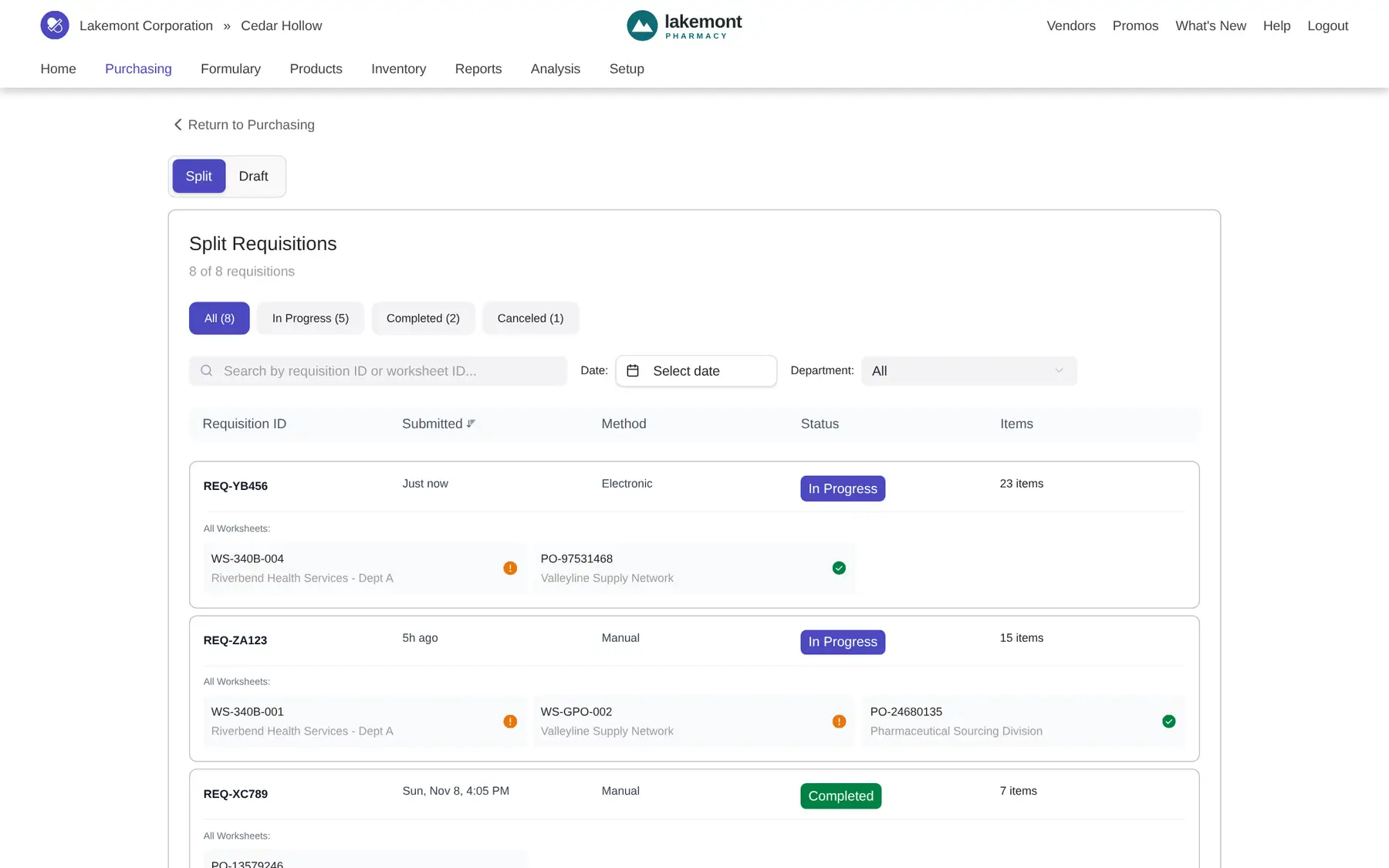
I first thought of this as a simple form that makes a list. It is really a hierarchy. One requisition holds several worksheets, and each worksheet holds its own line items. The status of the requisition comes from the worksheets under it. That shaped the whole screen.
There was a bigger question behind it. What if the best choice for compliance isn’t 340B? The goal was to get hospitals to start their orders in SureCost, so we could answer it for them.
Four limits, and none of them were comfortable.
No customers
Nobody to test with
SureCost had no hospital customers yet, and it did not want to shock the market. So I could not run usability tests. The design came from business analyst data and an outside market researcher’s findings.
One shot
A market where every hospital talks
Hospitals talk to each other. A failed launch would not lose one deal. It could lose the whole acute care market before we really entered it.
Volume
Very large orders
Orders in this world are big. The sample data in my designs includes requisitions of 1,500 and 2,313 items. People had to scan, split and trust lists that long.
Habits
Keep existing purchasing patterns
Hospital buyers were already doing this kind of import in other systems. I stayed close to the purchasing patterns SureCost customers already knew, so the new work would feel like part of the same product.
The research found a gap. The big hospital systems vendors, Epic and Cerner, treat this splitting work as tangential, not their main job. That gap is why SureCost went after it.
Requisitions as parents, worksheets nested under them, and an import that recovers from errors.
I kept the requisition as the parent, with its worksheets nested by channel. I considered a flat table and dropped it. People think “did Tuesday’s order process,” not in worksheet rows. A worksheet stays out of the way until you need to act on one.
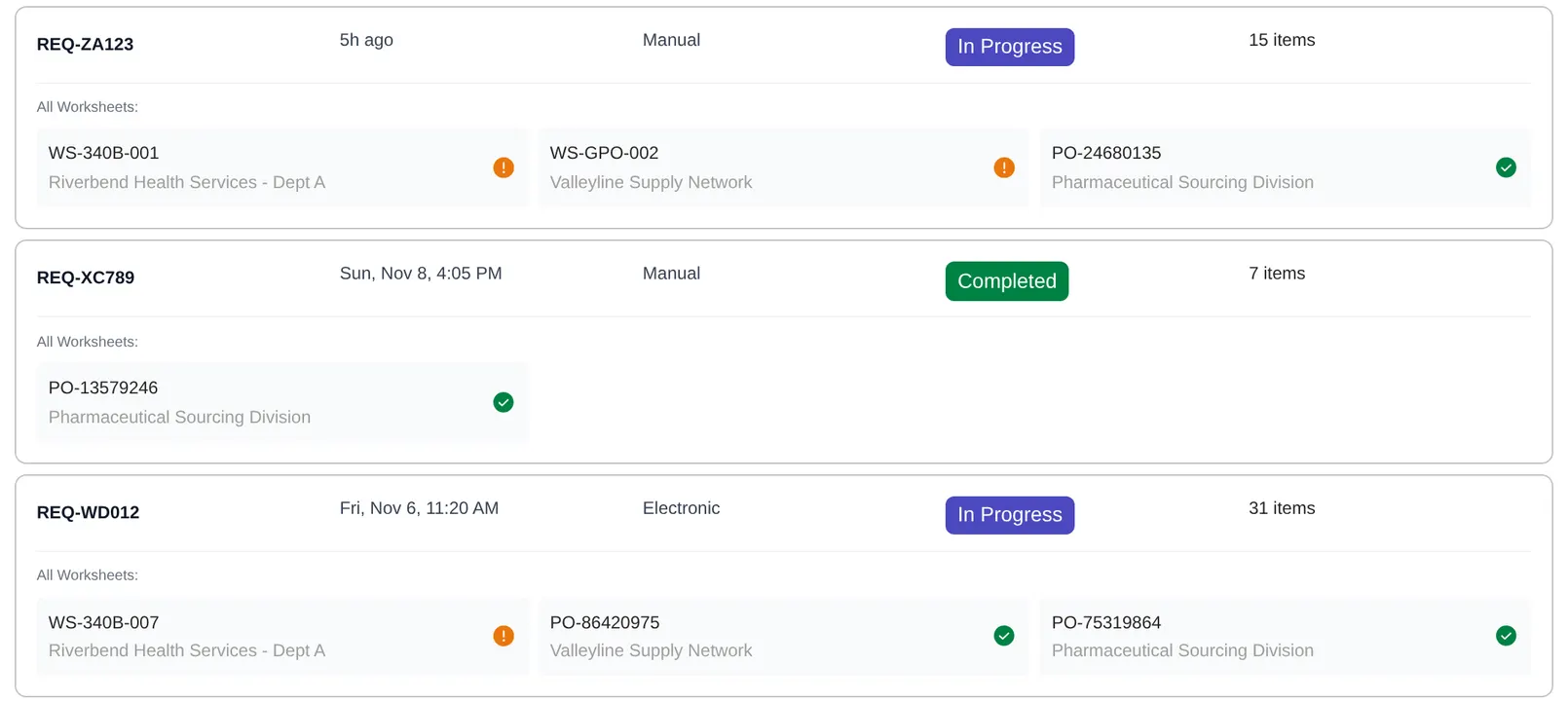
Status lives on the requisition and comes from its children. A warning shows on the worksheet it belongs to, so a long list doesn’t drown in alerts. Even the tab names were tested. QA read “Submitted” as finished, so Open and Submitted became Draft and Split. Done is a status, not a place.
The import let people start an order from a file they already had. Because strict rules keep the back end simple, I chose strict import rules, and let the design carry the human cost. A short screen explains every row that failed.
Scannable at volume, and forgiving when something is wrong.
Each requisition is one row that people can scan, with its worksheets nested underneath, grouped by channel. People can find “Tuesday’s order” first and open a worksheet only when they need to act on it.
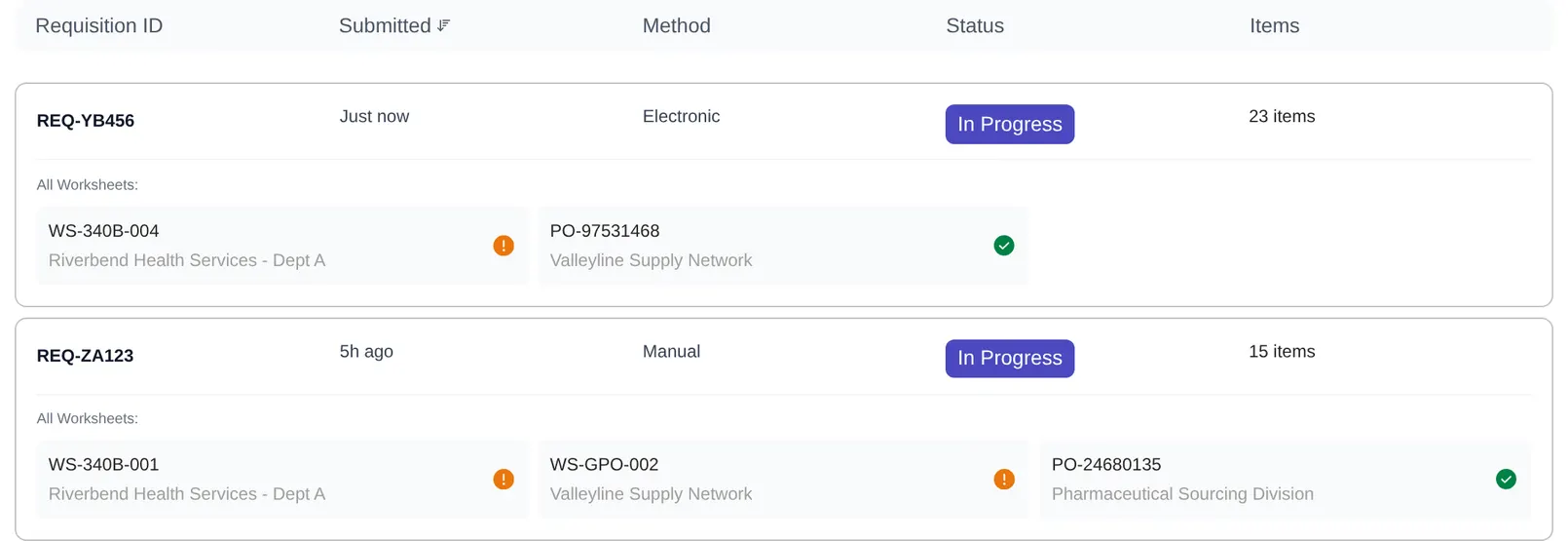
A warning icon sits on the worksheet it belongs to, not on the whole list. Status for the requisition is worked out from the worksheets below it, so people can see which order needs attention without opening every one.
Version one showed errors but let the valid items through, with no clear view of what was left out. Version two says how many items are ready, lists each failed row with its reason, and lets people import the valid ones now. Our users are rushed and short on staff, so they can also save a draft and fix the rest later.
Try this in the prototype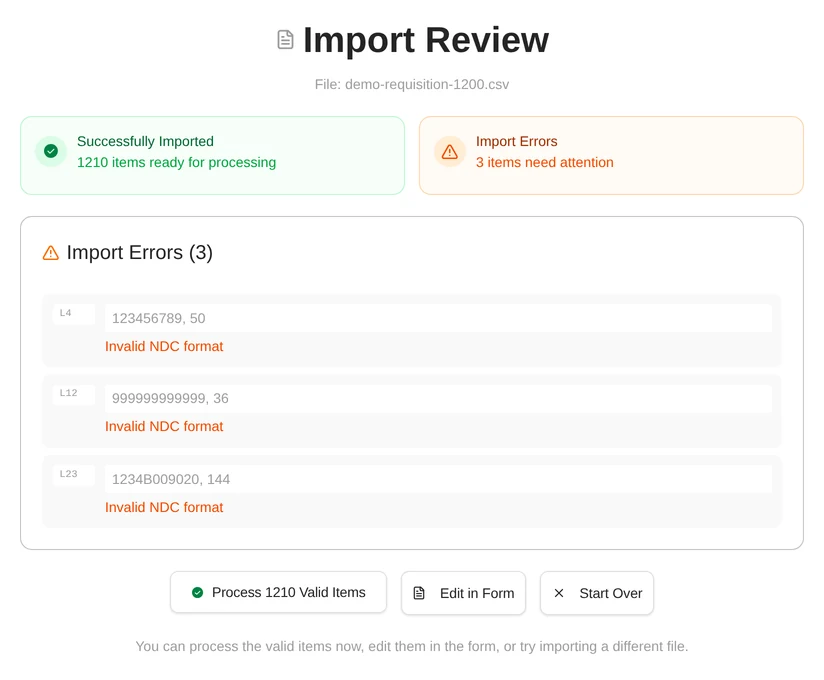
Engineering asked what happens when a list has thousands of rows and the errors are needles in a haystack. So rows with errors sort to the top. Checkboxes allow mass edit and mass delete, and each row can be corrected in line.
Try this in the prototype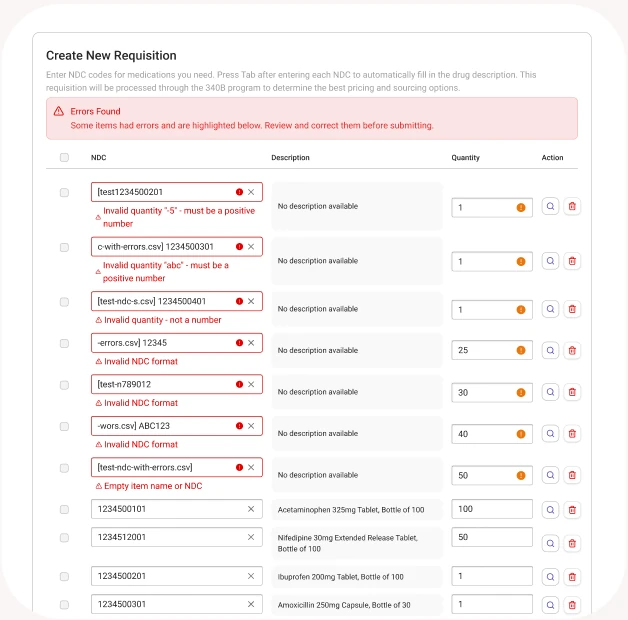
It reached staging and went in front of customers, but it hadn’t fully shipped.
Most of the workflow was built into staging and QA before I left SureCost in January 2026. We demoed it to customers. I can’t point to launch numbers, because it did not fully ship.
Two signals mattered to me. The lookahead I designed for adding items was pulled for technical cost. The product manager still saw so much value in it that we ran a spike on it. And he said the add-items pattern was good enough to become how worksheet ordering works across the whole product.
The patterns underneath, which are the add-items flow, error recovery and statuses, were built as the base for future purchasing screens.
Strict rules in the back end are fair when the design carries the human cost.
Challenges
I was handed the technical plan while scoping was already happening with an outside researcher. Customers weren’t available, so the design had to stand on analyst data, research and the engineers who pushed on it.
I was torn between flexible import rules and strict ones. I went strict to keep the back end simple, and because it is the usual pattern in SaaS. The error review screen is the other half of that choice. Design took on the human cost so engineering didn’t take on the complexity cost.
I built a working prototype in Figma Make, in code, to test the flow with engineering. It let me iterate in hours instead of days, and engineers could react to real front-end code instead of static mockups.
Retrospective
This is the same shape as many other problems. Records flow in from another system, rules allocate them, and someone has to review, fix and trust the result at volume.
It was also my first rework of the core of SureCost’s ordering, not a view built around it. Earlier work helped people understand their purchasing. This changed how purchasing happens.
How I’d know it worked.
- Error recovery rate
Of the people who hit import errors, how many carried on and how many gave up?
ProofA high abandon rate would mean the correction flow needs another look, and probably an easier way to fix rows.
- Drafts to submission
Do people who start a draft go on to submit it, or does it sit in draft?
ProofEmpty drafts, or drafts left for a long time, would add clutter to the system instead of helping people multitask.
- Upload versus manual time
Does uploading a file save people time compared with building an order by hand?
ProofIf upload to submission takes longer than manual entry, the system may be too rigid.
Nothing here has been measured yet. These are the questions I would ask.